Koa-JWT Usage and Common Issues
Basic Usage

1 | |
We define a secret key for signing/verifying tokens. The unless method takes an array of regex paths that should be excluded from authentication (like login and captcha endpoints). All other routes will require a valid JWT.
Login and Token Generation
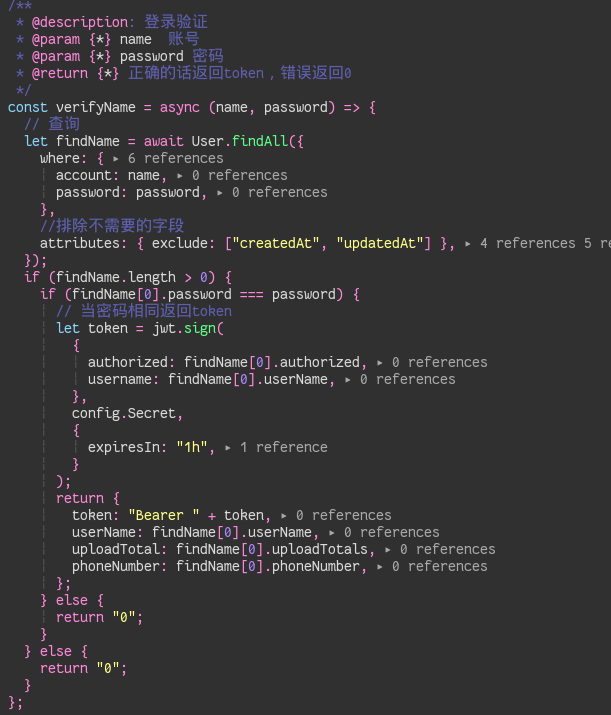
Here’s a simplified login flow (password encryption omitted for brevity):
- Verify Credentials: Check username and password against the database (e.g., using Sequelize).
- Sign Token: If valid, use
jwt.sign()to create a token.- Payload: I include
authorizedstatus anduserName(or role/permissions) to facilitate permission checks later. - Secret: Must match the one in
app.use(jwt(...)). - Options: Set an expiration time (e.g.,
1h).
- Payload: I include
- Response: Return the token. Important: The token standard usually requires the
Bearerprefix (with a space) when sending it back in the Authorization header, though here we just return the raw token string for the client to handle.
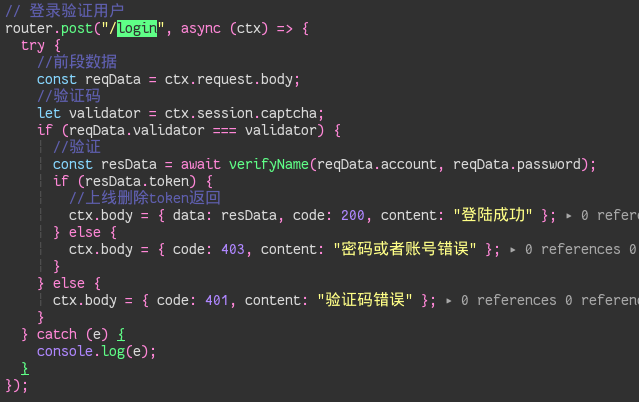
The controller receives the data, calls the verification function, and if successful, sends the token back to the frontend.