Axios File Download with Ant Design Button
Axios
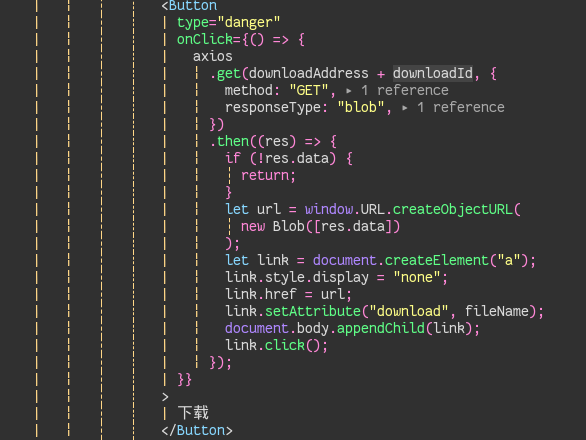
Here’s a quick implementation using an Ant Design button to trigger a file download. The logic applies to any UI framework—the core is handling the Axios response.
The key is setting responseType: 'blob' in the request config.
- Request: Send a GET request with
responseType: 'blob'. - Blob Handling: Verify you received the file.
- Trigger Download: Create a temporary URL for the blob, assign it to a hidden
<a>tag’shref, set thedownloadattribute to your desired filename, and programmatically click it. - Cleanup: Append the tag to the body, click it, and you’re done.
This pattern handles the binary data correctly and forces the browser to download the file instead of trying to display it.